Launching a Boutique? How to Get Photos for Your Entire Inventory (Without a Photographer)
June 30, 2026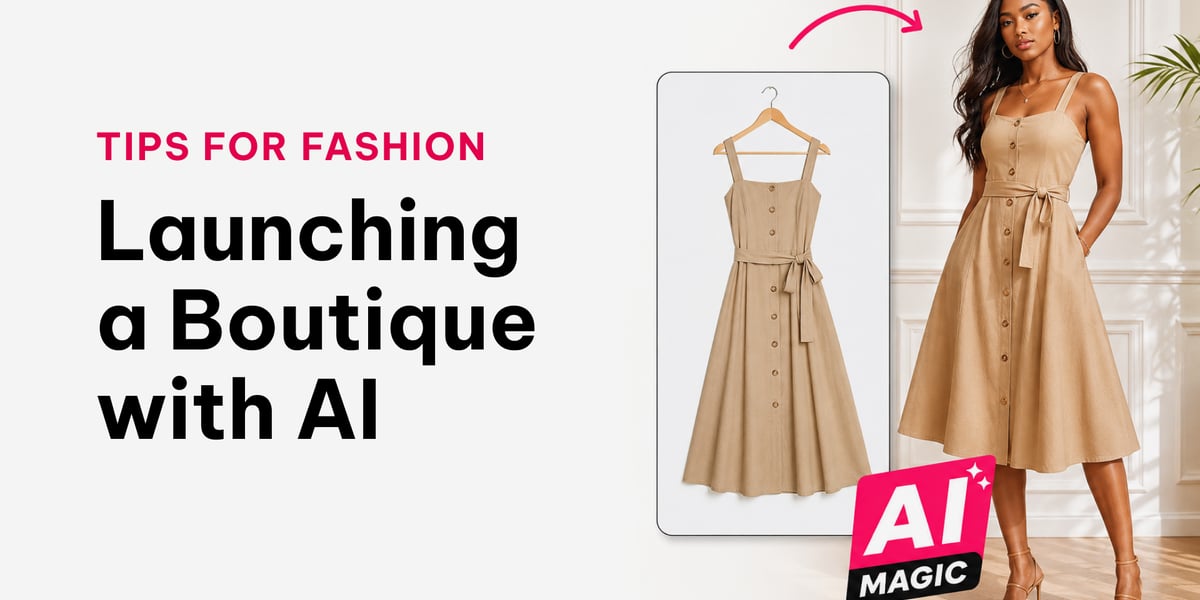
You're starting an online boutique. You have the stock. Now you need photos, good ones, of every single item. And hiring a photographer for your whole inventory is expensive and slow.
Here's the shortcut: an AI fashion photography app that puts your clothes on a realistic model in seconds. It lets a one-person boutique look just as polished as the big online shops, without a studio, a setup, or a big budget.
Whether you're building a Shopify store, selling through QuickSell, or just trying to keep a clean, consistent Instagram feed, this is how you get there fast.
Why photos make or break a new shop
Online, your photos are your shop. A customer can't touch the fabric or try it on, so the image does all the work of building trust and desire. Get it right and you look established. Get it wrong and you look risky.
Here's what good photos actually do for a new boutique:
- They build instant trust. Clean, professional images tell a shopper you're a real business worth buying from.
- They sell the item. Clothes look like something on a body and like nothing on a hanger. A model photo shows fit, drape, and styling.
- They cut returns. Accurate colour and clear detail mean buyers get what they expected, so fewer disappointed customers and refunds.
- They make you look bigger than you are. A consistent, polished catalogue makes a solo seller look like a serious brand.
That last point is the one most new sellers underestimate, so let's talk about it.
Compete with the bigger boutiques
The big online shops have always had one unfair advantage: budget. Professional photographers, studios, models, and editing teams. That's why their listings look so clean and yours, shot on a hanger in your living room, can look amateur by comparison.
AI photography erases that gap. Now you can put your clothes on a realistic model, on a clean background, in seconds, with no photographer and no studio. The result looks like the big shops' imagery, but it costs a fraction and takes minutes.
You no longer need a nice boutique space, a photography corner, or a fancy backdrop to compete. The setup is gone. The playing field is level. A first-time seller and an established retailer can now produce the same quality of photo.
The real cost: a comparison
A new boutique owner is doing budget math in her head, so let's put real numbers to it.
Traditional photoshoot: A photographer's day rate, plus a model, plus studio hire, plus editing. That's easily hundreds of dollars for a single session, and you wait days or weeks to book it and get the photos back. For a growing catalogue you repeat this every time new stock arrives.
Flat-lay photos at home: Free, but they make a new shop look amateur, and "amateur" costs you sales you'll never see. Shoppers scroll past listings that don't look trustworthy.
AI fashion photos: A small cost per photo, no subscription, and finished images in under a minute. No studio, no model fee, no waiting. You can photograph your entire inventory in an afternoon.
The ROI
Think of it as return on investment, not just cost. If a clean model photo turns even a handful of browsers into buyers who would otherwise have scrolled past, the photo pays for itself many times over. You're not spending money on photography, you're buying conversions, and at a few cents per image, the maths is hard to argue with.
How to launch a shop people trust
Looking trustworthy isn't luck, it's a few deliberate choices. Here's how to make a brand-new boutique feel legit from day one:
- Show clothes on a model, not just a hanger. It's the single biggest upgrade. It signals professionalism and helps buyers picture themselves in the item.
- Use one consistent model and background. This is the secret the big brands use. When every product is shot on the same model against the same clean background, your shop looks like one cohesive brand, not a random pile of items. With AI you can create a model and reuse it across your whole catalogue.
- Give multiple angles. Front and back views on the same model show the whole garment and answer the questions that otherwise lead to returns or hesitation.
- Keep colours accurate. Nothing breaks trust faster than an item arriving a different colour than the photo. Accurate colour reproduction keeps buyers happy and reviews positive.
- Be consistent everywhere. Whether it's your Shopify product pages, your QuickSell catalogue, or your Instagram grid, the same clean, on-model look across all of them makes you instantly recognisable and credible.
Do these five things and a brand-new shop can look as established as one that's been running for years.
Wherever you're selling
Your photos need to work across every place you sell, and a consistent set of model images does exactly that:
- Shopify: Clean, professional product-page photos that match what shoppers expect from a real online store.
- QuickSell: Polished catalogue images that make your broadcasts and listings stand out.
- Instagram: A consistent, beautiful feed where every post shares the same model and styling, so your grid looks designed, not thrown together. That visual consistency is what turns a casual scroller into a follower, and a follower into a buyer.
One set of photos, generated once, ready for all of them.
The fix: generate photos for your entire inventory
Relatable is built for exactly this moment. Snap a photo of each item on a mannequin or hanger, pick a model and a style, and get a finished photo in under a minute. It handles bulk product photos for clothing, so whether you have 10 items or 500, you can shoot your whole catalogue fast.
Why it works for a new boutique:
- Cheap clothing photos for your online store. Pay-as-you-go, no subscription, no studio costs. Credits never expire.
- Generate photos for your entire inventory at once, with no daily limits.
- Your own model, reused across every item, so your shop looks consistent and professional from day one.
- Front and back views with the same model, just like the big brands.
- A clean studio background, so you don't need a nice space or a backdrop of your own.
- Works for accessories too (hats, fascinators, bags), and you style the model however you like.
It's the simplest way to make your boutique look better before you've even launched.
Already have supplier images?
If you're importing and have photos from Alibaba, Shein, or AliExpress, Relatable can convert those generic images into your own unique boutique product photos for your local market, so you don't look like every other seller carrying the same item.
Quick questions new sellers ask
Will the photos look fake? Not if you use a tool built for fashion. The latest AI models produce photorealistic results, and you keep your product true to colour and detail.
Is it okay to use AI photos for my shop? Yes. Many large retailers already use AI models. The key is to keep the image accurate to the real item and, where a platform asks for it, note that it's AI-generated.
How many photos do I need per item? A main on-model shot plus a back view and a couple of detail or angle shots is plenty for most listings.
Do I need any equipment? Just your phone and a mannequin or hanger to photograph the item. No studio, lights, or backdrop required.
Bottom line
You don't need a photographer, a studio, or a big budget to launch a great-looking shop. With an AI fashion photography app, you can photograph your entire inventory cheaply, quickly, and consistently, look as professional as the bigger boutiques, and open your doors, on Shopify, QuickSell, or Instagram, this week.
Try Relatable free. Your first product photo is on the house.